Fallowing architecture of all awesome component demonstrate how a awesome android app design
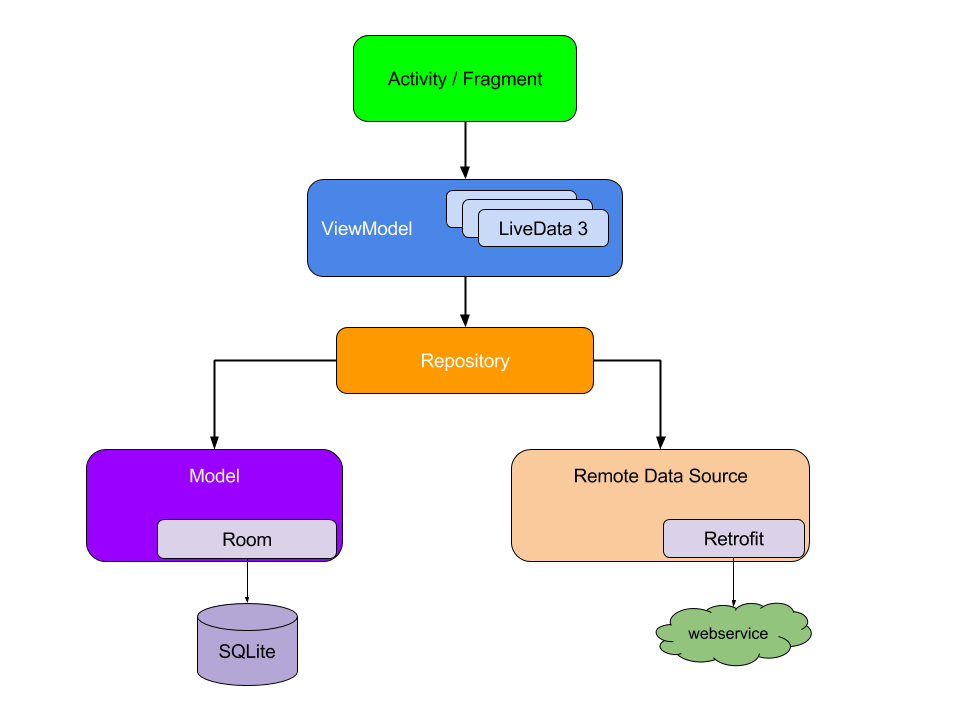

Type
|
Size
|
|
Double
|
64
|
|
Float
|
32
|
|
Long
|
64
|
|
Int
|
32
|
|
Short
|
16
|
|
Byte
|
8
|
|
fun
main(args: Array<String>) {
|
|
|
|
val
items = listOf(1, 2, 3, 4)
|
|
|
|
println("First
Element of our list----"+items.first())
|
|
|
|
println("First
Element of our list----"+items.last())
|
|
|
|
println("Even
Numbers of our List ----"+items.filter { it % 2 == 0 })
|
//
|
|
|
returns
[2, 4]
|
|
|
|
val
readWriteMap = hashMapOf("foo" to 1, "bar" to
2)
|
|
|
|
println(readWriteMap["foo"])
|
//
prints "1"
|
|
|
val
strings = hashSetOf("a", "b", "c", "c")
println("My
Set Values are"+strings)
}
|
|
|||||||
|
|
||||||||
Ranges
Ranges is another unique
characteristic of Kotlin. Like Haskell, it provides an operator that
helps you iterate through a range. Internally, it is implemented
using rangeTo()
and its operator form is (..).
In
the following example, we will see how Kotlin interprets this range
operator.
fun
main(args: Array<String>) {
val
i:Int =2
for
(j in 1..4)
print(j)
// prints "1234"
if (i in 1..10) { // equivalent of 1 <= i &&
i <= 10 println("we found your number --"+i)
}
}
|
|
|||||||
|
|
||||||||
|
|
||||||||
|
|
||||||||
|
|
||||||||
/** * Download image
* @param imageurl remote image url
* @param localpath your sd card path
* @return file object
*/
private File getPath(String imageurl, String localpath) {
    String filepath = null;
    File file = null;
    InputStream inputStream = null;
    try {

        URL url = new URL(imageurl);
        HttpURLConnection urlConnection = (HttpURLConnection) url
                .openConnection();
        urlConnection.setRequestMethod("GET");
        urlConnection.setDoOutput(true);
        urlConnection.setConnectTimeout(20000);
        try {
            urlConnection.connect();
            inputStream = urlConnection.getInputStream();
        } catch (SocketTimeoutException e) {

            return file;
        } catch (Exception e) {

            return file;
        }
        if (localpath != null) {
            file = new File(localpath);

            FileOutputStream fileOutput = new FileOutputStream(
                    file);

            int totalSize = urlConnection.getContentLength();
            int downloadedSize = 0;
            byte[] buffer = new byte[1024];
            int bufferLength = 0;
            if (inputStream != null) {
                while ((bufferLength = inputStream.read(buffer)) > 0) {
                    fileOutput.write(buffer, 0, bufferLength);
                    downloadedSize += bufferLength;               }
            }

            fileOutput.close();
        }
    } catch (Exception e) {
        e.printStackTrace();
        Log.i("ImageDownload", "Exception in DownloadRunnable" + e);
    }
    Log.i("filepath:", " " + filepath);
    return file;

}
MessageQueue. Each Handler
instance is associated with a single thread and that thread's message queue.
When you create a new Handler, it is bound to the thread / message queue of the
thread that is creating it -- from that point on, it will deliver messages and
runnables to that message queue and execute them as they come out of the
message queue.AsyncTask and Handler are written in Java (internally they use a Thread), so everything you can do with Handler or AsyncTask, you can achieve using a Thread too.AsyncTask is used to do some background computation and publish
the result to the UI thread (with optional progress updates). Since you're not
concerned with UI, then a Handler or Threadseems more appropriate.Handler communicates, it just gives a message to caller
thread and it will wait to process. Complicated? Just remember that Handler can communicate with the caller thread in a
safe way.